
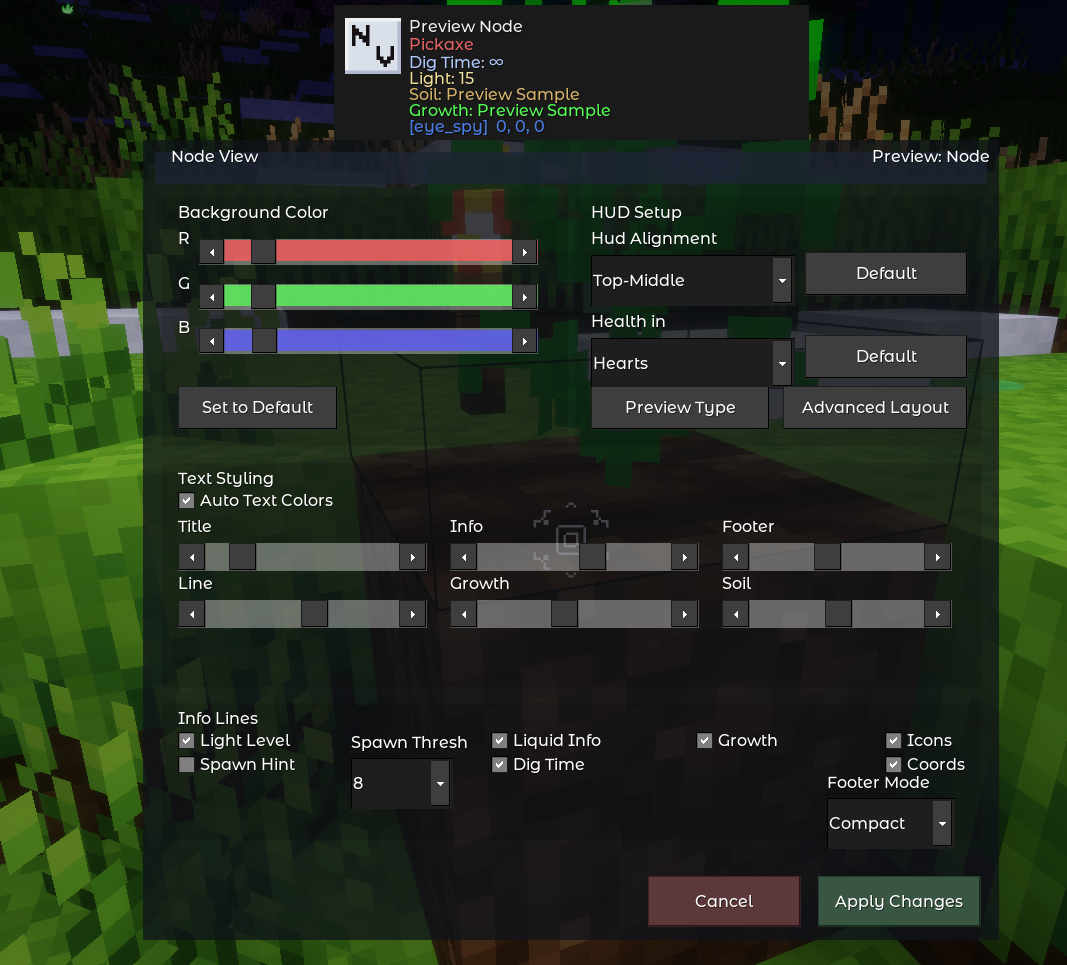



Eye Spy adds a live HUD that shows you everything about whatever you are looking at — the node name, which tool breaks it fastest, how long digging takes, the current light level, crop growth and soil status, entity health, and more. Every detail is configurable through an in-game editor with live preview, and the HUD updates continuously as you look around.
Eye Spy has no required dependencies and works in any game that follows standard Luanti node conventions.
Screenshots 🔗
 |
 |
| Crop growth and soil info | In-game settings editor with live preview |
 |
|
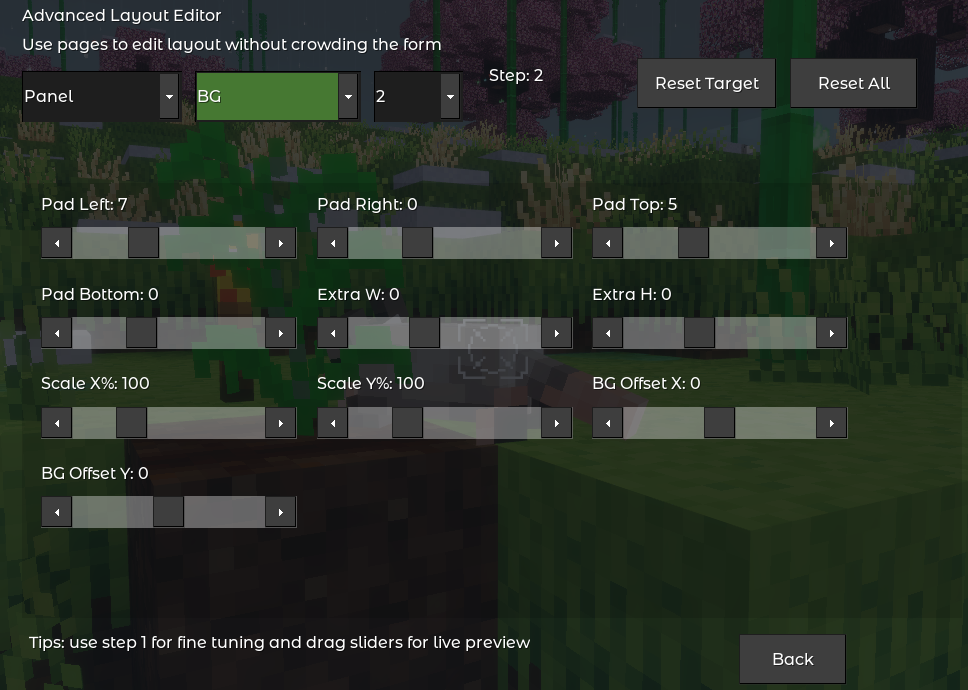
| Advanced Layout Editor |
Customization 🔗
- HUD background color — full RGB slider control with live preview
- Auto-contrast text — title text automatically switches between light and dark based on your chosen background color; semantic colors for info, footer, and soil lines are contrast-adjusted automatically
- Manual color spectrum — 6 independent hue sliders for Title, Info, Footer, Line, Growth, and Soil colors when auto-contrast is off
- 7 screen positions — Top-Middle (default), Top-Left, Top-Right, Middle-Left, Middle-Right, Bottom-Left, Bottom-Right
- Health display format — numeric Points or ❤ Hearts
- Per-feature toggles — enable or disable Light Level, Spawn Hint, Liquid Info, Dig Time, Growth, Icons, and Coordinates independently; Liquid Info is a single toggle that controls both liquid line visibility and scan-through targeting
- Footer modes — Compact (mod name only) or Advanced (mod name + full item identifier)
- Advanced Layout Editor — 35+ fine-grained sliders for pixel-level positioning of every HUD element
Performance 🔗
- Adjustable refresh rate — 100 ms default in singleplayer, 150 ms in multiplayer, configurable from 50–5000 ms
- Per-player rate overrides — server admins can set a different refresh interval for specific players without affecting others
- Multi-layer caching — target position, render signature, layout geometry, light samples, tool type results, and line colors are all cached to minimize unnecessary work each tick
- HUD auto-recovery — if HUD elements go blank after a long session, Eye Spy detects and restores them automatically
- Optional performance metrics — per-stage microsecond timing with avg/p95/max reporting via
/eye_spy_perf
Getting Started 🔗
Installation 🔗
- Place the
eye_spyfolder inside your world'smods/directory. - Enable the mod in the mod selection screen before creating or loading a world, or add
load_mod_eye_spy = trueto yourworld.mtfile. - Launch the game — the HUD appears automatically when you join.
Commands 🔗
| Command | Description | Privilege |
|---|---|---|
/eye_spy_settings |
Opens the settings and live-preview editor | — |
/eye_spy_rate show |
Shows your effective refresh rate and the server default | — |
/eye_spy_rate default <ms> |
Sets the server-wide HUD refresh rate (50–5000 ms) | eye_spy_rate |
/eye_spy_rate player <name> <ms|default> |
Sets or clears a per-player refresh rate override | eye_spy_rate |
/eye_spy_perf show |
Prints timing stats (avg / p95 / max) for all internal stages | eye_spy_rate |
/eye_spy_perf reset |
Clears all collected performance samples | eye_spy_rate |
/eye_spy_perf on |
Enables runtime performance metrics collection | eye_spy_rate |
/eye_spy_perf off |
Disables runtime performance metrics collection | eye_spy_rate |
/eye_spy_toggle |
Toggles your Eye Spy HUD on or off | — |
/eye_spy_status |
Shows your current HUD status and active refresh rate | — |
/eye_spy_admin disable <name> |
Suppresses the HUD for a player server-side | eye_spy_admin |
/eye_spy_admin enable <name> |
Lifts a server-side HUD suppression for a player | eye_spy_admin |
/eye_spy_admin show [name] |
Shows HUD status for one or all online players | eye_spy_admin |
The
eye_spy_rateandeye_spy_adminprivileges are granted automatically in singleplayer.
Configuration 🔗
These settings can be placed in minetest.conf or configured in the server's settings UI. They apply server-wide and take effect on the next server start.
| Setting | Default | Description |
|---|---|---|
eye_spy.show_entities |
true |
Show entity information in the HUD |
eye_spy.show_liquids |
false |
Enable liquid-aware targeting. When Liquid Info is on, Eye Spy scans through liquid, shows a liquid line, and can still display the target behind it |
eye_spy.always_show_hand_in_creative |
true |
Always display "Hand" as the tool type in creative mode |
eye_spy.texture_pack_size |
None |
Force all HUD icons to a fixed resolution. Use this when textures appear at the wrong size with a custom texture pack. Options: None, 16x16px, 32x32px, 64x64px, 128x128px, 256x256px, and higher |
eye_spy.update_interval |
0.25 |
Base update interval in seconds (used as a fallback; the rate system normally controls timing) |
eye_spy.enable_perf_metrics |
false |
Enable performance metrics collection at startup |
eye_spy.show_growth |
true |
Show crop growth and soil status lines |
eye_spy.show_icons |
true |
Show the target icon in the HUD |
eye_spy.default_show_coords |
false |
Default coordinates visibility for new players |
eye_spy.default_show_light_level |
true |
Default light level visibility for new players |
eye_spy.default_show_spawn_hint |
false |
Default spawn hint visibility for new players |
eye_spy.default_show_liquid_info |
true |
Default liquid info visibility for new players |
eye_spy.default_show_dig_time |
true |
Default dig time visibility for new players |
Per-player settings (colors, position, toggles, layout) are stored in player metadata and are managed entirely through the in-game /eye_spy_settings editor.
Advanced Layout Editor 🔗
The Advanced Layout Editor gives you fine-grained control over the exact position and scale of every HUD element. Open it from /eye_spy_settings → Advanced Layout.

The editor is split into three pages:
| Page | What you can adjust |
|---|---|
| Position | Global X/Y offset, per-element X/Y offsets, margins, icon and text base positions |
| Panel | Background padding (left/right/top/bottom), extra width/height, background scale % |
| Text | Scale percentage for Title, Info, Lines, and Footer text independently |
Use the Target dropdown to select which element to adjust (Global, BG, Icon, Title, Subtitle, Lines, or Footer). The Step control sets the slider increment — use 1 for precise tweaking and 8 for quick coarse movement. All changes preview live on your HUD as you drag. Use Reset Target to restore one element or Reset All to return everything to defaults.
Troubleshooting 🔗
HUD not appearing
Run /eye_spy_settings and click Apply Changes to force the HUD to reinitialize. Confirm the mod is listed as enabled for your world in world.mt.
Soil shows as Dry even though water is present Eye Spy scans for water within 3 blocks of the soil position. If the water source is further away, the farming mod's hydration ABM may not have updated the soil block yet — the HUD will reflect the correct state once it does. Moving the water to be directly adjacent resolves this immediately.
Icons appear at the wrong size
Set eye_spy.texture_pack_size in minetest.conf to match your texture pack's base resolution (for example, 64x64px for a 64× pack).
HUD disappears after a long play session
This is a Luanti HUD element timing quirk. Eye Spy detects the missing elements and restores them automatically, stare at a block or something which should trigger the hud and it should detect when it isn't showing and fix itself. Doesn't impact performance. You can also trigger an immediate recovery by running /eye_spy_settings and clicking Cancel.
Server performance impact
Use /eye_spy_rate default <ms> to raise the server-wide refresh interval. You can also give specific players a higher interval with /eye_spy_rate player <name> <ms> without changing the default for everyone else. Disabling unused info lines per-player also reduces work per tick.
Contributing 🔗
Bug reports, pull requests, and translations are all welcome. Please open an issue or PR on GitHub.
When reporting a bug, please include:
- Your Luanti version (
minetest --version) - Which game or modpack you are using
- Clear steps to reproduce the issue
License 🔗
- Code: LGPL v2.1
- Textures, Models, Sounds: CC-BY-SA 4.0
Credits 🔗
Created and maintained by cjgray24.
Really really good
Overall this is a really good mod. It does exactly what it's supposed to without issue, and is more responsive and provides more information than the alternatives (e.g. What is This OwO and co). It's also highly configurable, and that configuration can be accessed from an in-game settings menu with no need to exit to the main menu.
The only thing I'd like to see added is some more visual polish, maybe in the form of a set of selectable background images for the panel and a transparency slider or a color-controllable border like WAILA/HWYLA had. That doesn't take away from the mod at all though and would just be a cherry on top of an already great addition to any world, heavily modded or otherwise (as a lot of the information given is useful even in an otherwise vanilla MTG world).